Change the Time on Your Toyota's Clock | Toyota Tip Tuesday

Change the Time on Your Toyota's Clock | Toyota Tip Tuesday

Ready to make the most of longer days? Tune in to today's Toyota Tip Tuesday to learn how to change your time settings in your Toyota. Whether you're in a 2021 Highlander or our latest model, we've got you covered. Watch now for easy step-by-step instructions!


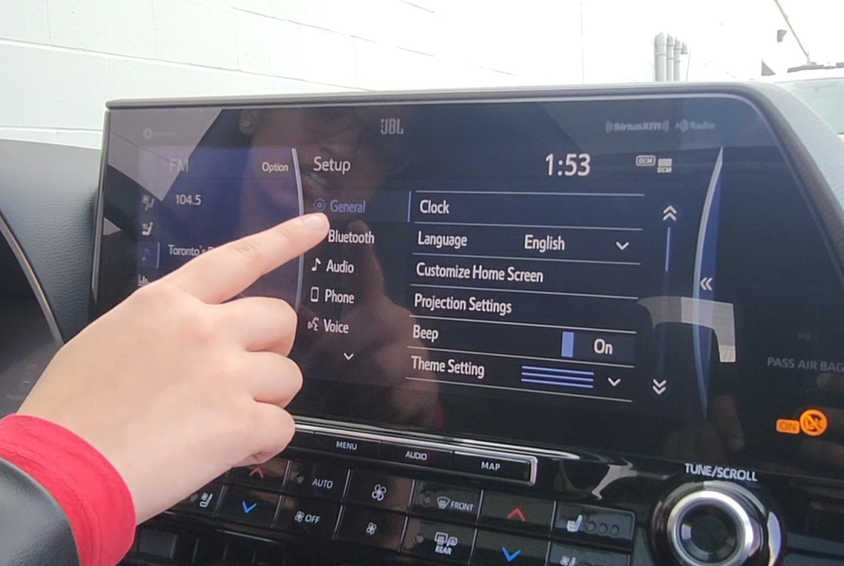
The weather is getting warmer and we now have an extra hour of beautiful sunlight to enjoy for the spring. So on today's episode of Toyota Tip Tuesday, I will be showing you guys how to change the time settings in your Toyota.  So here we are in a 2021 Highlander with our previous-generation multimedia display.

To set your time, we'll be starting by going over to Menu,  over to Setup, which will take us to General, and we'll be going over to Clock. Here we have a couple of different options. In Daylight Saving Time, when set to Auto, your time will change automatically. This can be turned on and off as well.  Going back, here we have Auto Adjust by GPS, which can be turned on and off.

When it is off, you can set the time manually.

Here we have our newest generation multimedia display. To set your time, we'll be heading over to settings, down to general,  and over to date and time.  Here you have the option to select a 24-hour time display by turning it on or off.  We also have a time zone setting. Now that we are in Daylight Savings, We will be turning this on, which will switch the time by itself.

To set the time automatically, you can turn this off and on as well. When it is off, you can hit set time manually, and you'll be able to do it manually.  And that's how you set your time in your Toyota.


You might also be interested in these blogs:

2026 TOYOTA Crown Signia

2026 TOYOTA Crown Signia
plus

Photo for illustrative purposes only.

More Details link-icon

Other Articles That May Interest You

2026 Toyota Warranty Breakdown: Coverage Periods and What's Included
plus

2026 Toyota Warranty Breakdown: Coverage Periods and What's Included

When you purchase a new Toyota, you receive comprehensive warranty protection designed to safeguard your investment. The 2026 Toyota warranty program continues the manufacturer's tradition of supporting owners throughout their ownership experience. This guide clarifies what coverage accompanies your new vehicle and explains how the warranty system operates. Toyota's warranty structure follows a...

Read more link-icon
Toyota Named Top Mass Market Brand in Canada for 7th Consecutive Year
plus

Toyota Named Top Mass Market Brand in Canada for 7th Consecutive Year

When you buy a vehicle, you're making an investment. And like any investment, you want to know it will hold its value over time. That's exactly why the J.D. Power 2026 Canada ALG Residual Value Awards matter to drivers across Ontario. These awards recognize the vehicles and brands that retain the highest forecasted value in their segments — a key factor in calculating lease payments and...

Read more link-icon
2026 Toyota Corolla FAQ: Everything Orangeville Drivers Need to Know
plus

2026 Toyota Corolla FAQ: Everything Orangeville Drivers Need to Know

The Toyota Corolla has been a trusted choice for Canadian families for over 50 years, and the 2026 lineup continues that tradition with meaningful updates across Gas Sedan, Hybrid, and Hatchback models. With options ranging from the fuel-efficient Hybrid to the spirited Hatchback and the value-packed Gas Sedan, the 2026 Corolla family offers something for every driver in Orangeville and across...

Read more link-icon